Watch a quick look at the Gobble Gobble PNG and SVG Thanksgiving Shirt Design files.
Gobble Gobble PNG and SVG Thanksgiving Shirt Design
Instant download — delivered as digital files, nothing is shipped.
Secure checkout opens in a new tab, and your download is ready the moment payment clears.
- Instant download right after checkout
- Print-ready, high-resolution files
- Yours to re-download any time
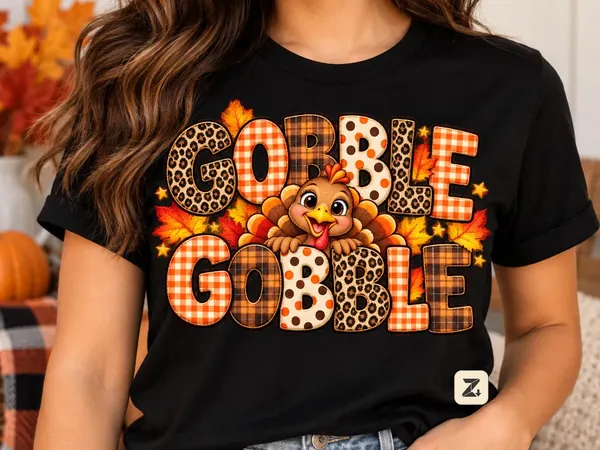
Patterned GOBBLE GOBBLE letters with a smiling turkey face, in PNG plus an SVG for cutting machines.
What's included
- 1 Gobble Gobble design as PNG
- Matching SVG file for cutting machines
- PNG at 4500 x 5400 px, 300 DPI
- Transparent background
- Licence for personal use and small scale product sales
This Gobble Gobble design is a fun Thanksgiving shirt idea with a lot of pattern packed in. The words GOBBLE GOBBLE sit in two stacked lines, and each letter is filled with a different texture: leopard print, orange gingham, brown plaid and cream polka dots, repeating in turn. Between the two lines a cute turkey face peeks out with big eyes, a yellow beak and a happy smile, its tail feathers fanning behind. A few autumn leaves and small gold stars finish it off.
You get both a PNG and an SVG. The PNG is 4500 by 5400 pixels at 300 DPI with a transparent background, ready for a full front shirt print of about 15 by 18 inches. The SVG is included for cutting machines such as Cricut and Silhouette.
Why people love this Thanksgiving design
Patterned letters are a big trend on holiday shirts, and the mix of leopard and gingham feels playful without being messy. The turkey face keeps it friendly for kids and adults alike, so it works for the whole family at Thanksgiving dinner, Friendsgiving or a school turkey trot.
The design has no other text, no watermark and no logo. It is cut out cleanly, so it sits well on any shirt color.
PNG or SVG: which should you use?
Use the PNG for sublimation, DTF transfers, printable vinyl and any printing method. It holds all the detail of the patterns.
Use the SVG with a cutting machine when you want to cut shapes, resize without any loss, or adapt the layout. Detailed patterns like leopard print are part of the artwork, so for cut vinyl you may want to simplify the design to one or two layers. For full color results, printing is the better route.
Pressing tips for sublimation
Sublimation needs a white or light colored polyester blank, ideally 65 percent polyester or more. Print the PNG mirrored on sublimation paper, press at around 385 to 400 degrees Fahrenheit for 45 to 60 seconds with medium pressure and peel while warm. Always follow the settings for your own press and blank, because they vary between brands.
Using the design with DTF or HTV
For DTF transfers, send the PNG to your printer at full size. The transparent background means no white box is printed around the art. For heat transfer vinyl, a full color design like this one is best as printable HTV: print it, cut around the edge with print then cut, and press it on cotton or blends.
Ideas beyond the shirt
Sublimate the design on a mug or tumbler for a Thanksgiving host gift. Put it on a tote bag for the grocery run before the big meal. Print it on sticker paper and decorate place cards. Make a matching set of kids' tees for family photos. Use it on a printable sign for your Friendsgiving table.
File details in plain words
The PNG is 4500 by 5400 pixels at 300 DPI with a transparent background. The SVG is a vector file that scales to any size without blurring. Both files are delivered through Etsy as soon as payment clears, and nothing is posted to you.
How the download works
After checkout, open Purchases and reviews on Etsy or the email Etsy sends you and download the files. If you use a phone, it is easier to download on a computer, because cutting machine software and print programs run there.
Your files stay in your Etsy account, so you can download them again later.
Licence in plain words
You may use the design for personal projects and sell physical products you make with it, such as shirts, tote bags and mugs, on a small commercial scale. Please do not share, resell or upload the digital file itself.
Why ZETIOX shirt designs
We prepare each design at full print size, check the transparent edges and make sure the spelling and layout are right before it goes into the shop. You get a clean, ready to press file instead of something you need to fix first.
Sizing guide
For adult shirts, a width of 10 to 11 inches is a good starting point. Youth shirts look best at 8 to 9 inches, and toddler tees at about 6 inches. Place the top of the design roughly three inches below the collar. For a mug, scale it to fit your wrap template and leave a little space around the edges.
Care tips for finished shirts
Wash finished shirts inside out in cold water and tumble dry on low or hang to dry. Avoid ironing directly on the print. These simple steps keep the colors bright for many Thanksgivings.
New to digital shirt designs?
You buy the file once, download it straight away and keep it. There is no shipping. If you have a question about your press, your blanks or the file, send us a message before or after you buy.
Product FAQs
Do I get both PNG and SVG?
Yes. You receive a 4500 by 5400 pixel PNG at 300 DPI and an SVG for cutting machines.
Is the spelling and layout final?
Yes. GOBBLE GOBBLE is spelled correctly in two stacked lines with the turkey face between them, exactly as shown.
Can I cut this with vinyl?
You can use the SVG with a cutting machine, but the detailed patterns look best printed. For full color, use printable vinyl, sublimation or DTF.
Can I sell Thanksgiving shirts with it?
Yes, physical products made with the design can be sold on a small scale. Please do not share or resell the files.