
Stickers & Clipart
Silly Goose Clipart, 60 Watercolor PNG Bundle
$1.99Original price $4.97SAVE 60%
Buy
Watch a quick look at the Biweekly Budget Planner files.
Instant download — delivered as digital files, nothing is shipped.
Secure checkout opens in a new tab, and your download is ready the moment payment clears.
An automated Google Sheets budget planner for biweekly paychecks, with bills, savings and debt tracking.
This biweekly budget planner is an automated Google Sheets template that helps you plan every paycheck before it arrives. If you are paid every two weeks, monthly budgets can feel awkward, because some months have three paydays and bills never line up neatly. Budgeting by paycheck fixes that. You decide where each check goes, and the spreadsheet does the math.
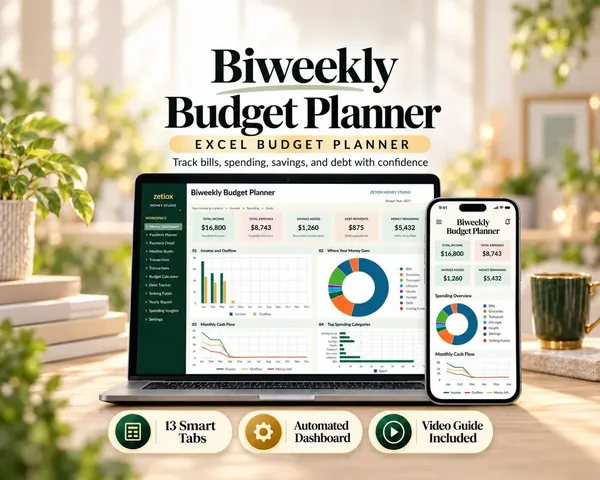
There are 13 connected worksheets, a dashboard with charts, a PDF guide, a video guide, an example workbook filled with sample data and extra printable PDF worksheets.
Paycheck planning lets you list your income and give every dollar a job for that pay period. The bill calendar shows when each bill is due, so you can match bills to the right paycheck. Expense tracking records what you actually spend and compares it with your plan. Savings goals and sinking funds keep track of money set aside for holidays, car repairs, birthdays and anything else that comes around once a year. The debt payoff tracker follows your payments and shows your progress toward being debt free.
The dashboard pulls it all together. Monthly and annual summaries and charts update automatically as you enter numbers, so you see your whole financial picture without building a single formula.
Anyone paid biweekly. Anyone who likes a zero based budget, where income minus planned spending equals zero. Beginners who want a simple, guided budget template. People juggling savings goals, sinking funds and debt payments at the same time. Couples who want one shared view of their money, since Google Sheets can be shared between two accounts.
If spreadsheets make you nervous, start with the example workbook. It is filled with sample data, so you can see what every tab looks like in use. Then follow the PDF guide or watch the video guide, which walk you through setup step by step.
Buy and download your files from Etsy. Open the template in Google Sheets and make your own copy. Enter your paycheck amounts and dates, list your bills with due dates, add your savings goals and debts. Each payday, plan the paycheck and log your spending as you go. Check the dashboard once a week to see how your plan compares with reality.
A Google account, which is free, and access to Google Sheets on a computer, tablet or phone. The template does not work in Excel or Numbers, because it relies on Google Sheets formulas. The printable PDF worksheets work with any printer if you like a paper copy too.
A monthly budget assumes all your money arrives at once. A paycheck budget follows how money really comes in. It helps you avoid the classic problem of rent and the car payment falling in the same week as a small check. It also shows you when your "extra" third paycheck months arrive, which is a great chance to boost savings or pay down debt.
This is a digital product and nothing is shipped. After checkout, download your files from Purchases and reviews on Etsy or from the Etsy email. The template link opens in Google Sheets, where you make your own copy to edit.
Your copy lives in your own Google Drive. We cannot see your numbers, and nothing you enter is shared with us.
Set a recurring reminder on payday to open the planner. Keep categories simple at first, maybe ten or twelve, and add detail later. Round your numbers up when planning bills so you have a small cushion. Review the dashboard every Sunday for five minutes. Small, regular check ins beat one big monthly session that you dread.
Most people are fully set up in under an hour. Start with your income and fixed bills, because those rarely change. Add variable spending like groceries and fuel as rough estimates, then adjust them after your first two pay periods once you see real numbers. The dashboard becomes more useful each week as your history builds up.
A sinking fund is money you set aside a little at a time for a cost you know is coming, such as car insurance, school supplies or holiday gifts. Instead of a big bill shocking your budget, you save a small amount from each paycheck. The planner tracks each fund separately, so you can see exactly how much is ready for every goal.
The debt tracker lists each balance, its payment and your progress. Many people use the snowball method, paying off the smallest balance first for a quick win, or the avalanche method, targeting the highest interest rate first. The tracker works with either approach and shows your total debt shrinking over time, which is very motivating.
Message us on Etsy before or after buying and we will help you get set up.
No. It is built for Google Sheets and needs a free Google account. It does not work in Excel or Numbers.
Yes. It includes a PDF guide, a video guide and an example workbook filled with sample data.
Yes. Share your Google Sheets copy with your partner so you both see the same budget.
No. Your copy lives in your own Google Drive and we have no access to it.
Yes. Extra printable PDF worksheets are included if you also like a paper copy.